Shopify · August 23, 2026 · 11 min read
Best Shopify Themes for Eyewear & Optical Stores
Compare Optics, Vision, and Retina for frame measurements, lens choices, variant media, mobile discovery, and optical-store workflows.
By Polo Themes
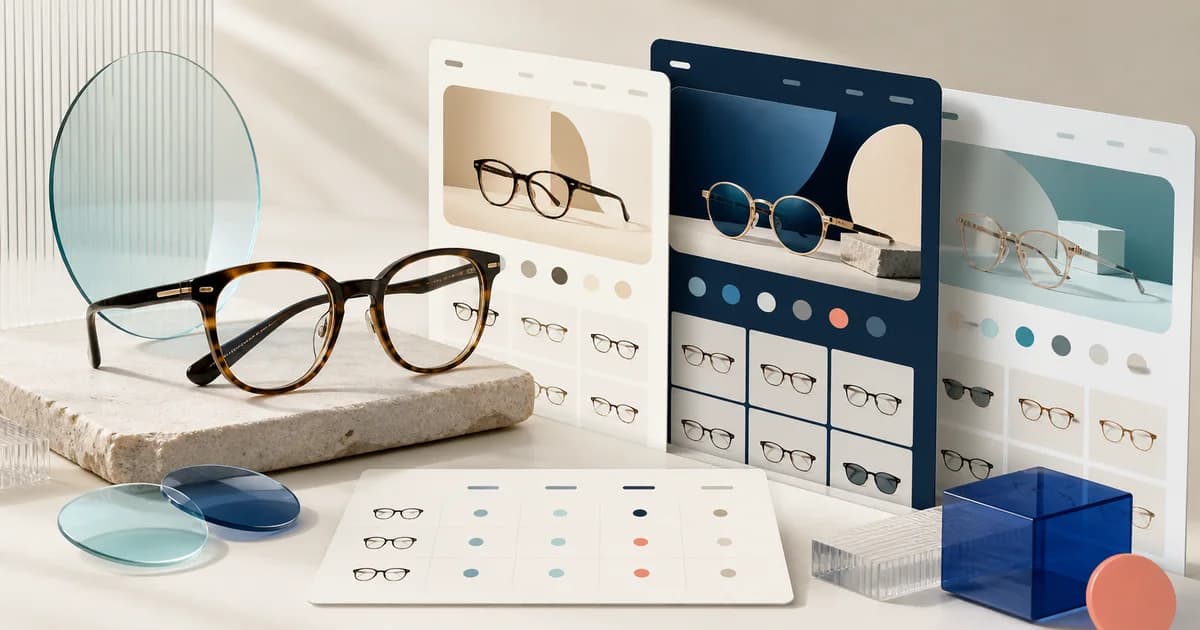
The best Shopify theme for an eyewear or optical store is Optics when the priority is a purpose-built frame catalog with a clean hierarchy. Vision ranks second for flexible product cards and media-led merchandising, while Retina ranks third for a simpler image-forward store. This is an editorial ranking based on optical decision support, catalog clarity, mobile selection, and implementation risk—not a speed, sales, or popularity leaderboard.
Start with the complete niche comparison, then inspect the Optics product page and the related sunglasses guide. Use the contact-lens comparison to test parameter-heavy catalogs, and the eyewear launch guide to separate theme choice from supplier, service, and fulfillment readiness.
How did we rank eyewear Shopify themes?
We ranked optical themes by frame identity, measurements, variant media, lens boundaries, and maintainable catalog data. Shopify explains in Shopify Help Center — Variants that each option-value combination can form a distinct variant, supporting our state-by-state test. Vendor listings still do not prove prescription handling, fit accuracy, or production results.
Eyewear shoppers do not merely choose a color. They compare frame shape, dimensions, material, fit context, lens presentation, availability, and what is included. We therefore rank themes by five editorial criteria: whether frame identity survives on collection cards; whether measurements can sit near the selected variant; whether media can follow color changes; whether lens and service information can be separated from the frame; and whether the merchant can maintain those facts without fragile one-off pages. Vendor claims are inputs to test, not proof of a production result.
- 1. Optics — best direct optical match. Polo’s seed describes a modern, minimal Shopify theme for eyewear with visual hierarchy, clean typography, readable contrast, easy editing, customization, and extension. Its limit is equally important: the seed does not claim prescription validation, virtual try-on, pupillary-distance capture, or lab fulfillment.
- 2. Vision — best alternative for media-rich product discovery. Its official Theme Store page lists product-card variations, product video support, size charts, product options, enhanced search, filtering, a mega menu, and swatch filters. Those are useful surfaces for frames, but they do not establish optical workflows or measurement accuracy.
- 3. Retina — best alternative for a smaller visual assortment. Its official listing supports image-focused merchandising such as galleries and zoom. Treat it as a presentation candidate for a bounded frame collection, not evidence that lens configuration or professional review is included.
Which candidate fits which optical store?
Optics fits a frame-led specialist, Vision a broader media-rich assortment, and Retina a smaller studio catalog. The Shopify Theme Store — Vision listing documents product videos, filtering, and swatch filters, making that comparison defensible. Choose only after shoppers can identify frames, understand measurements, and reach a truthful service next step on mobile.
Choose Optics when frames and lenses define the catalog and you want the closest vocabulary match from Polo’s catalog. Choose Vision when varied cards, video, search, and filtering matter more than a ready-made optical identity. Choose Retina when the assortment is small enough that strong imagery and a restrained page can do most of the discovery work. If prescriptions, insurance, appointments, virtual try-on, or laboratory handoffs are launch-critical, keep every candidate provisional until the separate service works inside an unpublished theme.
What should a worked frame-catalog comparison test?
Test one multicolor frame, one multiwidth model, one unavailable combination, and one accessory across collection, product, cart, and support views. Shopify describes each option-value combination as a distinct product version in Shopify Help Center — Variants. The preview must keep model, color, dimensions, availability, included items, and the frame-versus-lens boundary synchronized.
Imagine a catalog with a rectangular acetate frame in three colors, a metal aviator in two widths, a low-stock children’s frame, and a cleaning kit. The collection card should distinguish model, shape, material, and available color without pretending that every lens choice is a product variant. On the acetate page, a shopper selects crystal gray, sees the matching images, chooses the available width, finds eye, bridge, and temple measurements beside that choice, and learns exactly what the frame price includes before encountering any lens service.
Run the same record through all three previews. In Optics, judge whether the direct optical hierarchy reduces configuration work. In Vision, test whether its card variations and swatch filters remain understandable with real model names. In Retina, determine whether the simpler visual approach still exposes measurements early enough. The winning preview is the one in which a new tester can identify the correct frame and explain the next lens step without relying on demo photography or staff coaching.
Eyewear failure modes to reject
- Detached measurements: a generic guide lists numbers but never ties them to the selected size or model.
- Lens ambiguity: the shopper cannot tell whether the purchase covers a frame, a standard lens, or a configured prescription order.
- Variant-media drift: the swatch says tortoiseshell while the gallery, cart line, or delivered identifier describes another color.
- False fit certainty: face-shape labels or a try-on overlay are presented as guarantees without a maintained basis.
- Service overclaim: theme presentation is described as prescription review, professional advice, insurance processing, or lab fulfillment.
How should you implement and accept an optical theme?
Implement the finalist around normalized frame data, the hardest valid product, maintained discovery attributes, and separately governed lens services. Shopify says in Shopify Help Center — Metafields that custom data can extend products and orders. Accept only after tests preserve identity, media, dimensions, availability, cart output, recovery, and an unpublished rollback path.
- Normalize the data first. Choose one name and unit for eye size, bridge width, temple length, total width, material, shape, and color; audit supplier records for omissions and transpositions.
- Build the hardest valid product. Include several colors, more than one width, a sold-out combination, long model text, measurement guidance, included items, and a clear frame-versus-lens boundary.
- Configure discovery. Use collections and filters only for attributes the team can maintain consistently, then verify that search results preserve model identity.
- Exercise every state. On mobile and desktop, change each option and confirm the media, identifier, availability, purchase action, and cart line remain synchronized.
- Test integrations independently. Complete valid, invalid, edit, abandonment, support, privacy, and recovery paths for any prescription or try-on service.
- Record the decision. Score each theme against the same tasks, note native behavior versus customization, assign unresolved risks, and preserve a rollback-ready draft before publishing.
When should Vision or Retina outrank Optics?
Vision should outrank Optics when a broad optical-and-sun catalog benefits from richer cards, video, and maintained swatches without hiding measurements. Those capabilities appear in Shopify Theme Store — Vision. Retina can lead a small frame-only studio when restrained imagery keeps fit facts accessible, but either reversal needs observed catalog tasks rather than demo preference.
Direct niche fit gives Optics the first preview, not an automatic victory. Vision should move ahead when the real assortment depends on several card treatments, video, and maintained swatch filters across a broad sun-and-optical catalog, provided testers can still reach measurements and lens boundaries without detours. Retina can move ahead for a small, frame-only studio where a few carefully photographed models carry the range and every dimension remains visible on the product page. In either reversal, write down the reason in catalog terms. “The demo felt better” is not a decision record; “all twelve models remained distinguishable on mobile and staff changed a measurement without code” is.
Optics should retain the lead when its optical hierarchy lets the team model frames with fewer special templates and keeps the frame-versus-lens decision obvious. It should lose if that vocabulary becomes decorative while a required width, measurement, or service state is hidden. Vision should lose if its richer cards create competing labels or swatches that imply unavailable combinations. Retina should lose if its image-first restraint pushes fit facts below several screens. Candidate names matter here because each brings a different risk: adaptation in Vision, information compression in Retina, and false confidence from direct positioning in Optics.
How do you recover from a frame, lens, or service mismatch?
Pause the affected option or handoff, preserve the exact frame selection, correct its accountable record, and verify every state before reopening. The US FTC — Complying with the Eyeglass Rule guidance distinguishes prescription-release duties from product presentation. Recovery should offer a valid edit or exit without letting support improvise professional fit decisions.
Use a deliberate recovery drill rather than testing only a clean purchase. A shopper adds the crystal-gray acetate frame in the wider size, begins a separate lens handoff, then returns after learning that the selected service cannot accept the supplied information. The storefront must preserve the exact frame choice, explain whether the frame can be purchased alone, provide a route to edit or abandon the lens step, and avoid retaining sensitive information beyond the service’s documented behavior. Support must be able to locate the commercial order without guessing about a professional decision that the theme does not own.
Next introduce a supplier correction: the temple length for one width was transposed. Remove or quarantine the affected option, correct the authoritative record, verify the page and any measurement guide, inspect carts or draft orders that referenced it, and give support approved correction language. Do not solve the problem by adding a banner while stale measurements remain elsewhere. Reopen the option only after card, product page, selected state, cart, order, and service handoff agree. This recovery distinguishes a maintainable optical storefront from one whose facts are trapped in theme sections and image captions.
Which acceptance gates should an optical launch pass?
Require identity, measurement, lens-boundary, media, and maintenance proof before launch. The US FDA — Contact Lenses page identifies contact lenses as medical devices requiring a prescription, reinforcing an honest separation from theme presentation. Evidence must also show exact models, scoped dimensions, synchronized imagery, and an editor who can restore the prior theme.
- Identity gate: every tested card, search result, product page, cart line, order, and support view preserves model, color, width, and the merchant’s exact identifier.
- Measurement gate: each published dimension names its unit and model or size scope; the test includes a missing value and a corrected value, neither of which is silently inferred.
- Lens-boundary gate: a new tester can state what the frame price includes, where lens configuration begins, and what happens when that separate step fails or is abandoned.
- Media gate: changing color or width never leaves a conflicting gallery, caption, selected label, availability state, or cart description.
- Maintenance gate: the assigned editor can update one frame, retire one option, and restore the prior unpublished theme without rewriting the product template.
Who should own optical data and service changes?
Assign named owners to frame records, measurements, imagery, lens language, services, merchandising, and support. Shopify Help Center — Metafields notes that staff need corresponding resource permissions to edit definitions and values, supporting explicit custody. Product changes need approval, service changes need retesting, and support corrections must return to their accountable source.
Name an owner for frame records, supplier imagery, lens language, measurements, support content, and every external service. The product-data owner should approve model and dimension changes before they reach a theme draft. The merchandising owner should verify that collection labels remain based on maintained attributes. The service owner should review prescription, try-on, or appointment handoffs after any app or theme update. Support needs an exact route for correcting an order without improvising professional advice. This division matters because an optical page can look unchanged while a supplier revision, unavailable lens, or integration setting silently alters what can be fulfilled.
Before publication, create a short acceptance record for each candidate: theme version, tested frame records, devices, option states, integrations, screenshots, unresolved risks, and rollback location. Repeat the high-risk tests after a navigation edit, product-template change, app update, or new measurement source. A theme choice is complete only when the merchant can keep its optical answers current. If Optics needs less adaptation but a required service remains unproven, record the service as a launch blocker rather than allowing direct niche fit to hide it.
Key Takeaways
- Preview Optics first for direct optical structure, then test Vision and Retina against the identical frame fixture.
- Keep model, color, width, measurements, media, availability, and cart identity synchronized.
- Separate frame commerce from prescription, lens-lab, insurance, appointment, and virtual try-on services.
- Reject any theme state that implies guaranteed fit or leaves corrected dimensions in stale surfaces.
- Publish only with named data owners, recovery evidence, and a rollback-ready unpublished theme.
Conclusion
Optics is the strongest first preview for a frame-led optical store because it is the only candidate here whose verified Polo description is directly about eyewear. Vision is a credible discovery-heavy alternative, and Retina suits a bounded visual catalog. None should be chosen from styling alone. The durable choice is the preview that keeps model, fit, measurement, lens boundary, availability, and support understandable with the merchant’s real data.
Frequently asked questions
Does Optics include virtual try-on?
The seed data does not claim virtual try-on. Evaluate a separate provider and test its privacy, device support, accuracy boundaries, failure states, and recovery inside the candidate theme.
Should lens choices be Shopify variants?
Only when every combination can be priced, validated, fulfilled, and supported as modeled. Complex prescription or professional workflows often need a separately governed handoff rather than an uncontrolled option list.
What should appear on an eyewear collection card?
Preserve the model identity and the few attributes that drive opening decisions, such as shape, material, color cue, and availability. Keep precise measurements and consequential lens details on a page that can explain them.
Can a theme guarantee frame fit?
No. A theme can present verified measurements and guidance. Physical fit depends on the product, the customer, the measurement method, and any qualified service the merchant provides.
How should an optical store handle a corrected measurement?
Pause the affected option if the error could change a purchase, correct the accountable product record, and verify every rendered measurement and selected state before restoring it. Review open carts or orders that used the earlier value and give support product-specific correction guidance. A generic notice is not enough when a stale diagram, caption, or service handoff can still show the wrong dimension.