Figma · August 23, 2026 · 9 min read
Using Figma Variables and Design Tokens
Use Figma variables to connect reusable values to semantic tokens, modes, and developer-facing names without treating raw colors as product meaning.
By Polo Themes
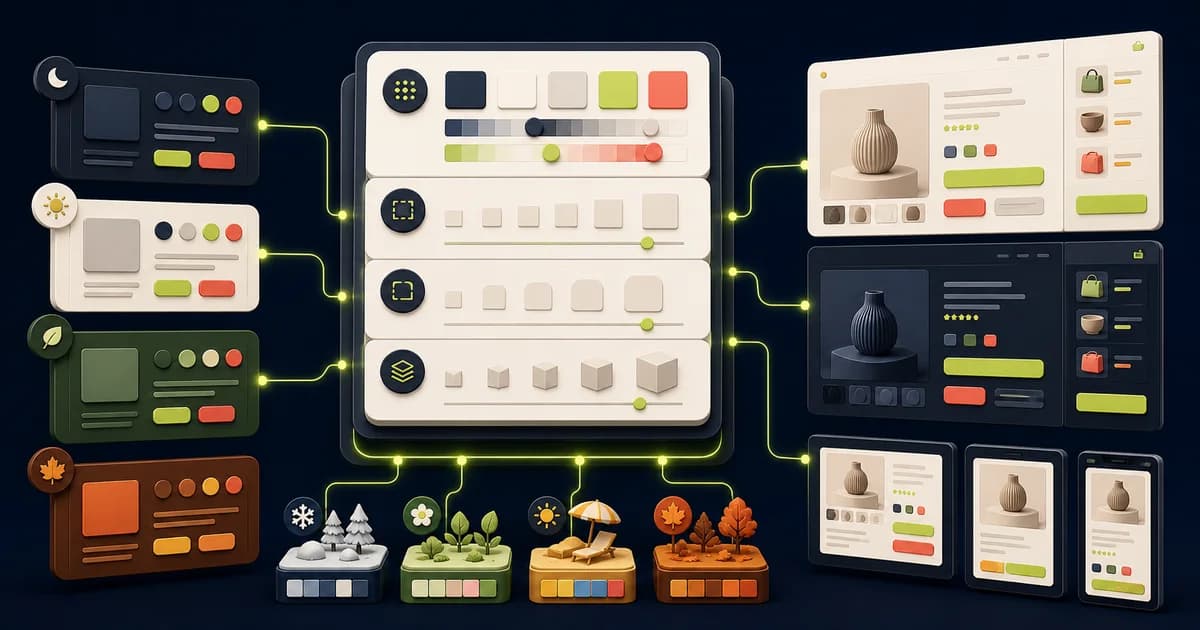
Variables store reusable values; design tokens give those values stable meaning across design and code. A useful system separates raw scales from semantic decisions, so changing a brand color or density mode does not require editing every component.
Key Takeaways
- Separate primitives from semantic intent and component decisions.
- Use modes only for coordinated contexts with defined ownership.
- Name variables so design and code can map them without guessing.
- Test token changes across commerce states before publishing.
How should you define a token taxonomy?
Figma’s “Overview of variables, collections, and modes”, retrieved in 2026, defines 6 variable types. Build a taxonomy around those supported data shapes, then add semantic categories such as text, surface, action, focus, spacing, and motion. Names should express purpose and hierarchy without embedding a current color, page, or tool-specific syntax.
Inventory repeated decisions before drafting names. If designers cannot choose between several nearly identical roles, the taxonomy has encoded implementation history rather than product meaning. The e-commerce website design guide supplies the route, component, and state inventory needed to distinguish genuine shared roles from one-page exceptions.
Document whether names use category-role-state, namespace-category-role, or another consistent structure. Define casing and alias rules. A design token should represent a decision worth sharing; not every canvas measurement deserves promotion. Audit existing products first so the system reflects repeated needs rather than an imagined universal scale.
How do you map variables to code syntax?
Figma’s “Overview of variables, collections, and modes”, retrieved in 2026, distinguishes 6 variable types, but code also needs names, units, scopes, and fallbacks. Agree those mappings with engineers before exporting. A number may mean pixels, duration, weight, or a unitless ratio; the transform must preserve that intent explicitly.
Create one round-trip fixture that includes aliases, a mode override, a dimension, and a component consumer. Review the generated diff and resolved browser values rather than trusting a successful export notification. The commerce design-token guide shows how that mapping supports price, inventory, action, and status roles across storefront components.
Automation can serialize values but cannot decide whether a change is compatible. Store generated artifacts where the codebase expects them, review diffs, validate downstream components, and keep the authoritative source explicit. Avoid simultaneous manual editing in Figma and code without a reconciliation rule.
Why should you separate primitives semantics and components?
Figma’s “Guide to components in Figma”, retrieved in 2026, distinguishes 2 linked roles: main components and instances. Token layers need a similar source-to-consumer separation. Primitives store raw scales, semantic aliases express purpose, and component tokens refine a stable pattern only when a shared semantic role is not specific enough.
Test the dependency direction during a brand change: components should retain names such as action-primary while semantic aliases resolve to new primitives. Direct primitive consumers expose raw styling decisions and multiply migration work. The Figma design-system guide adds ownership, contribution, documentation, and release rules for this layered contract.
Avoid components consuming primitives directly unless the primitive is itself the intended contract. Semantic aliases create an intentional dependency chain that developers can inspect. Keep alias depth understandable; a long chain of indistinguishable layers makes debugging harder and can hide which team owns a change.
How should you model commerce states beyond color?
W3C’s “Understanding Success Criterion 1.4.3: Contrast (Minimum)”, retrieved in 2026, specifies text thresholds of 4.5:1 and 3:1. Resolve commerce roles such as inventory-warning and price-compare against their actual surfaces in every mode, then pair color with words, icons, or structure. A passing ratio alone cannot identify what the state means.
Audit sale price, unavailable options, delivery notices, validation errors, and success confirmations side by side. If several states share a hue, their labels and component anatomy must still distinguish them. The team libraries guide explains how to publish these paired visual-and-content patterns so consumers do not reconstruct them inconsistently.
Test token combinations on real components. Promotional backgrounds need readable text and controls; disabled values still need comprehension; focus indicators must contrast against adjacent surfaces; price styling must remain clear in sale and non-sale contexts. Token quality is proven in use, not in a tidy table.
How should you build a semantic token model?
Figma’s “Overview of variables, collections, and modes”, retrieved in 2026, supports aliases across 6 variable types. Keep primitives such as blue-600 or space-300 beneath roles such as action-primary, text-muted, surface-raised, and control-gap. Components should consume semantic roles so a theme can change resolved values without changing their intended meaning.
Use a product card and form field to test the model. Trace each resolved value from primitive through alias to component, then switch brand or theme mode. The Dev Mode handoff guide explains how to expose those alias chains and mode contexts without asking developers to copy raw values.
- Define naming grammar before volume.
- Alias semantic tokens to primitives.
- Avoid binding brand meaning directly to hexadecimal names.
How should you plan modes as coordinated contexts?
Figma’s “Overview of variables, collections, and modes”, retrieved in 2026, applies modes across 6 variable types. Use a mode only for a coordinated context such as brand, light and dark, or density. Keep unrelated axes separate, define defaults and fallbacks, and prevent combinations that design and code cannot safely support.
Test nested contexts, such as a dark promotional panel inside a light page, and content that cannot inherit variables, such as third-party media. Document which container sets each mode and how overrides resolve. The editable PoloThemes Figma bundle provides product, cart, and checkout screens for exercising those combinations.
Check Figma plan and access constraints before making modes critical to team delivery. Build representative test frames for each supported combination and include third-party or unthemed content. In code, define fallback behavior so a missing or delayed preference does not produce unreadable or flashing interfaces.
How can you use collections and modes deliberately?
Figma’s “Overview of variables, collections, and modes”, retrieved in 2026, organizes 6 variable types through collections and modes. Group collections by ownership and delivery responsibility, not by arbitrary file convenience. Create modes only for coordinated substitutions, then confirm team access, plan limits, inheritance, defaults, and code representation before relying on them.
Separate foundations owned by the design system from brand, density, or market values maintained elsewhere. Then place mixed-mode components inside realistic storefront compositions and inspect what inherits. A collection boundary is useful when it clarifies ownership and release cadence; it is harmful when consumers must guess which duplicate value is authoritative.
- Document default and fallback modes.
- Keep modes orthogonal where possible.
- Test mixed-mode containers.
How should you prepare for code without promising automatic sync?
Figma’s “Guide to Dev Mode”, retrieved in 2026, documents 4 asset export formats, illustrating that handoff output is not automatic code synchronization. Add code syntax only after agreeing names, units, and authority. Exporters can serialize values, but ownership, review, versioning, deprecation, and reconciliation are still required to prevent drift.
Write down whether Figma, a token repository, or application code is authoritative for each artifact. Give generated files a repeatable command and reviewable diff, and prohibit simultaneous uncoordinated edits on both sides. A failed or unsupported conversion should remain visible rather than silently becoming a raw fallback value.
- Map tokens to CSS or platform variables explicitly.
- Review changes like API changes.
- Record deprecated aliases and migration steps.
How do you maintain a token decision log?
Figma’s “Overview of variables, collections, and modes”, retrieved in 2026, spans 6 variable types, so one visual adjustment can affect multiple contracts. Log material additions, renames, mode changes, and deprecations with the problem, alternatives, affected roles, code mapping, accessibility review, migration owner, and release decision. Keep current values separate from decision history.
A useful entry explains why two similar values intentionally differ, which consumers prove the distinction, and what evidence would justify consolidation later. Link the decision from release notes and the affected token documentation. This preserves rationale without turning the log into a second, drifting source of machine-usable values.
How should you test the token system through change?
Figma’s “Overview of variables, collections, and modes”, retrieved in 2026, defines 6 variable types that can be exercised through controlled change. Switch a brand accent, increase spacing, apply a dark mode, strengthen focus, and adjust warning treatment. The intended roles should update while unrelated product, collection, cart, and checkout meaning remains stable.
Run each exercise first in a representative Figma composition, then through the real export or transform into code. Record raw values that fail to move, aliases that change too broadly, unsupported types, and unreadable combinations. Restore the baseline using the documented rollback instead of repairing individual layers by hand.
Review the corresponding code diff or export artifact with engineering. Check units, alias resolution, fallbacks, mode names, and deprecated values. Restore the baseline through the documented rollback rather than manual canvas repair. These exercises prove that the system can support coordinated change and expose raw or incorrectly aliased values before a real rebrand makes them urgent.
Govern releases and deprecation
Assign owners for primitives, semantics, components, and platform transforms. Review proposed additions for duplication and accessibility, publish change notes, and version breaking changes. Consumers need to know whether accepting a library update changes only a value or also requires component and code migration.
Deprecate aliases with a replacement and deadline instead of silently deleting them. Audit detached or raw values to measure adoption. When a token no longer represents real product use, remove it through a staged migration. Governance keeps a small system coherent as brands, themes, and product states multiply.
Trace a semantic variable from Figma to code
Choose a role such as action background, critical text, or surface border and trace it from primitive value through semantic alias, mode, component property, exported token, platform transform, and rendered CSS. Repeat for supported brands and theme modes. Name and meaning remain stable when the resolved value changes; consumers should not need the underlying hex code to choose correctly.
Render traced roles in a product card, option selector, notice, form error, and primary action across default, hover, focus-visible, selected, unavailable, and disabled states. Check contrast and non-color communication after aliases resolve. Look for raw values, broken references, circular aliases, unsupported types, and code names that drifted from Figma. Record deliberate platform differences at the transform.
Treat the trace as release evidence. A variable rename or mode update identifies affected components, files, packages, and migration steps before publication. Deprecate old aliases with a replacement and deadline, then measure remaining use. This audit keeps variables from becoming a Figma-only palette and proves a semantic decision reaches the rendered interface.
Implementation checklist
- Primitive and semantic layers are distinct.
- Modes represent real contexts.
- Components consume semantic variables.
- Design and code ownership is documented.
Conclusion
Tokens work when they preserve meaning across tools. Start with a small semantic vocabulary tied to real components, then expand only when repeated decisions justify it.
Frequently asked questions
Are Guide to variables in Figma the same as design tokens?
Not exactly. Variables are a Figma feature for reusable values and modes; tokens are a cross-platform method for naming and exchanging design decisions. Variables can implement part of a token system.
Should designers or developers own tokens?
Ownership should be shared and explicit. Design validates visual meaning, engineering validates platform expression, and product teams agree on change and release rules.